Microsoft Advertising for Performance Marketers: Search, Audiences & Cross-Platform Strategy
Mid-level marketers targeting Performance Marketing Specialist roles who already run Google Ads campaigns and need to extend their platform fluency to Microsoft Advertising / Bing Ads.
- Navigate the Microsoft Advertising UI and configure a new account ready for live campaigns
- Import, audit, and remediate Google Ads campaigns using the 2026 Import Center
- Build a travel-sector keyword plan and write RSAs optimized for the Bing audience
- Layer in-market segments, LinkedIn Profile Targeting, and UET-based remarketing onto search campaigns
- Launch and optimize a Performance Max campaign using 2026 transparency reports
- Implement Enhanced Conversions with first-party data and build a performance reporting dashboard
- Construct a data-driven 70/30 budget allocation framework and define reallocation triggers
Microsoft Advertising Platform Orientation: Interface, Account Structure & the Google Ads Migrant's Mindset
The Microsoft Advertising Hierarchy
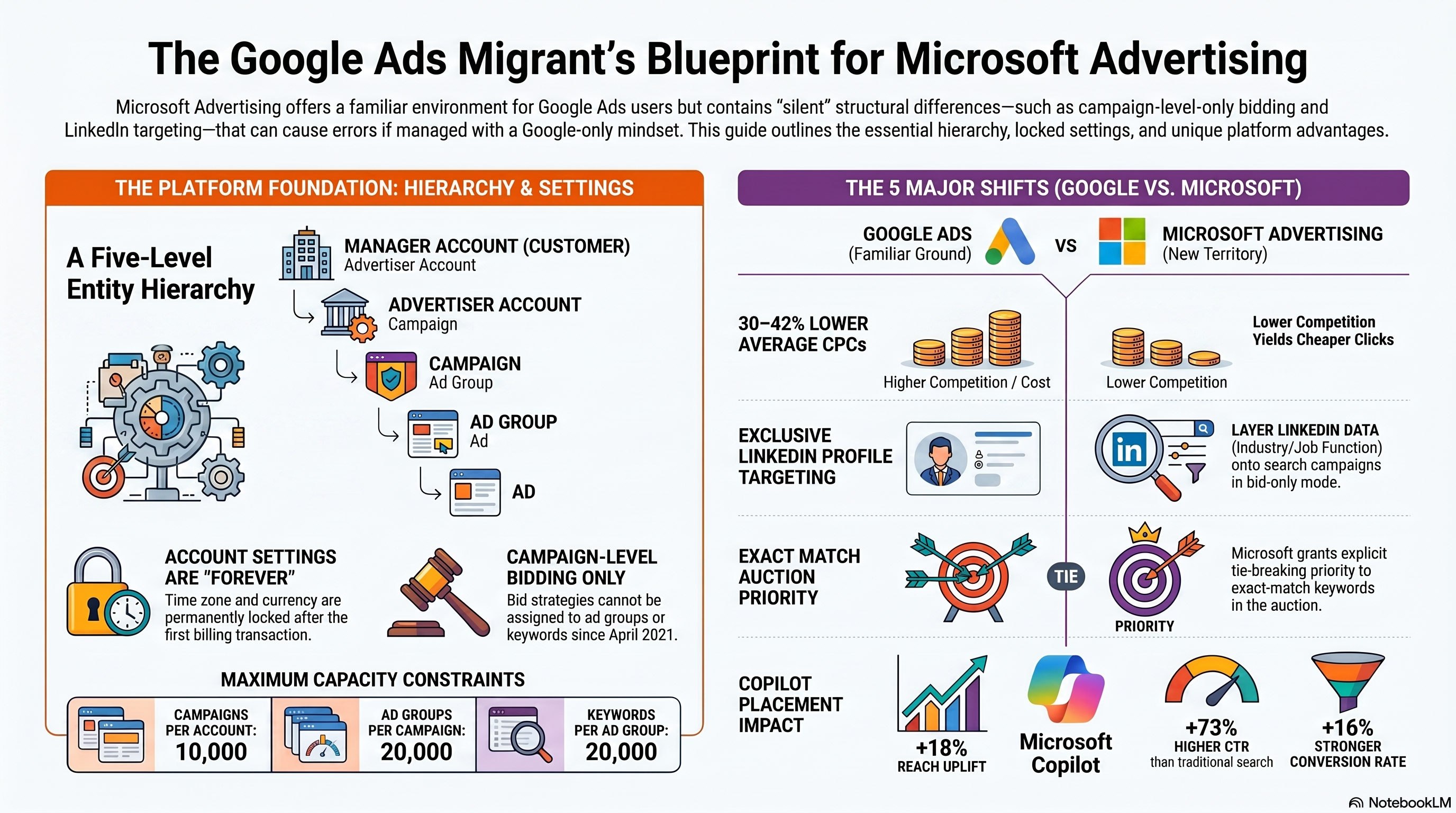
Microsoft Advertising organizes everything into five levels: Customer (Manager Account) → Advertiser Account → Campaign → Ad Group → Ad. If you come from Google Ads, the Customer level maps to a Google MCC — it holds billing authority and user permissions for all accounts beneath it. The Advertiser Account is where the payment instrument lives; campaigns draw budget from here.
The capacity limits matter for planning. According to Microsoft's entity hierarchy documentation, each account supports up to 10,000 campaigns, each campaign up to 20,000 ad groups, and each ad group up to 100 ads (active and paused combined), with a hard cap of 3 active Responsive Search Ads per ad group and 20,000 keywords per ad group. These ceilings rarely bind a standard advertiser but matter at agency scale.
One rule that trips up Google Ads migrants from day one: bid strategies are set at the campaign level only. Since April 2021, Microsoft Advertising does not support bid strategy assignment at the ad group or keyword level. You cannot apply Target CPA per ad group — set the strategy once per campaign and keep your ad groups tightly themed so the algorithm has clean signal to work with.
Account-Level Settings: Lock These In First
Two account settings are permanently locked after the first billing transaction: time zone and currency. Choose the wrong timezone during free-trial setup and your reporting never realigns without creating a new account. Set the time zone to your business's primary operating timezone and confirm the currency matches your Google Ads account if you plan to run both platforms in parallel.
The third setting to configure before any campaign goes live is the tracking template. At the account level, the template must include at least one landing-page URL placeholder — {lpurl}, {unescapedlpurl}, {lpurl+2}, {lpurl+3}, or {escapedlpurl} — and must begin with http://, https://, or the placeholder itself. The URL Tracking with Upgraded URLs documentation specifies a maximum length of 2,048 characters. A reliable starting template for most advertisers:
{lpurl}?utm_source=bing&utm_medium=cpc&utm_campaign={CampaignName}&utm_term={KeyWord}&utm_content={AdId}&msclkid={msclkid}
Set this once at the account level and it covers every campaign automatically; override at campaign or ad group level only where you need different parameters, since lower levels take precedence.
Fourth, configure UTM auto-tagging via the AutoTagType setting. Three modes: Inactive (nothing appended), Preserve (append UTM tags without overwriting manually-added parameters), Replace (append and overwrite existing UTM values). Preserve is the safe default for accounts that already use custom UTM strings. Note that UTM auto-tagging and MSCLKID auto-tagging are two separate toggles — enabling one does not enable the other. MSCLKID feeds Microsoft Advertising's conversion tracking; UTM feeds GA4 and other analytics tools.
Building Your First Search Campaign Skeleton
Navigate to Campaigns → Create campaign and select Search as the campaign type. The campaign form asks for budget type (Daily is the default and the easiest to control early on), bid strategy (start with Maximize Clicks until conversion data accumulates), location targeting, language, and ad distribution network.
The network toggle deserves attention: Search Partners extends your reach to Yahoo, AOL, DuckDuckGo, and Ecosia in addition to Bing. For an initial test, disable Search Partners so you can isolate pure Bing performance first — partner traffic quality varies by category and can distort early CPCs.
Inside the campaign, create at least one ad group with a tightly themed keyword set. Three to five exact-match terms aligned to a single user intent is the right starting size. Set a default CPC bid, then add at least one Responsive Search Ad placeholder — you will build out the full RSA with 15 headlines and 4 descriptions in 03-keyword-strategy-rsa. The goal here is a working skeleton, not a finished creative.
Five Structural Differences vs Google Ads
Reprogramming your Google Ads assumptions is half the work of launching on Microsoft Advertising. Here are the five structural differences that shape every decision.
Network reach. Microsoft Search Ads serve on Bing, Yahoo, AOL, DuckDuckGo, and Ecosia. StatCounter's 2026 US desktop data shows Bing at ~17.6% versus Google at ~76.3%. Smaller audience, but measurably less competition — CPCs run 30–42% lower than comparable Google Ads categories.
Auction mechanics. Ad Rank = Quality Score × Bid, with Quality Score a 1–10 composite of Expected CTR, Ad Relevance, and Landing Page Experience. The components match Google's, but the signal weights differ. As of December 2025, exact-match keywords receive explicit auction tie-breaking priority — a nuance without a Google equivalent.
LinkedIn Profile Targeting. Microsoft Advertising is the only platform other than LinkedIn itself that lets you layer LinkedIn profile attributes — Company, Industry, and Job Function — onto Search and Audience campaigns. It operates in bid-only mode: it raises bids for matching users but does not exclude others. Full configuration is covered in 04-audience-targeting-linkedin-remarketing.
Copilot surfaces. "Copilot" refers to two distinct things here. First, Copilot in Microsoft Advertising is the AI assistant embedded in the platform UI — it generates ad copy, images, and banners, runs campaign diagnostics, and surfaces performance root causes. Second, Ads in Copilot is a distribution channel: your campaigns can appear inside Bing Copilot conversations via an "ad voice" format, with no extra bid required — Performance Max campaigns are auto-eligible (see 05-performance-max-setup). According to Microsoft's Copilot advertising overview, Copilot reached 320 million MAUs in Q2 FY2026 (+148% YoY), and advertisers in Copilot placements see on average 18% more reach without additional CPC cost.
Import fidelity. The Import Center lives at Tools → Import → Import from Google Ads and pulls campaigns directly from Google via OAuth, with scheduled recurring imports available. The import is fast but not 1:1 — bid strategies without a Microsoft equivalent (e.g., Target Impression Share) revert to Manual CPC, and some ad extensions need manual re-association after import. The full import workflow and audit checklist are in 02-importing-auditing-google-ads.
Hands-on Exercise: Orient and Configure
Scenario: Set up a new Microsoft Advertising account for a travel agency and build a one-campaign skeleton.
- Create or open an account. Before entering payment details, set the time zone to your business's primary timezone and currency to match your Google Ads account.
- In Account Settings, add the tracking template:
{lpurl}?utm_source=bing&utm_medium=cpc&utm_campaign={CampaignName}&utm_term={KeyWord}&msclkid={msclkid}. - Set AutoTagType to
Preserve. - Create a Search campaign named
[Brand]_Search_Test_[Country]with a $10 daily budget, Maximize Clicks bid strategy, and one target location. Disable Search Partners for now. - Add one ad group with three exact-match keywords relevant to your product.
- Navigate to Tools → Import and confirm you can see the Import Center — but do not run an import yet.
Success criteria: Account settings saved without errors; tracking template passes the validation check; campaign and ad group appear in the Campaigns view with status Enabled; Import Center is accessible and shows the Google Ads import option.
Next chapter: 02-importing-auditing-google-ads walks you through running and auditing the Google Ads import end-to-end.
Importing & Auditing Google Ads Campaigns into Microsoft Advertising
Setting Up the Import Center Connection
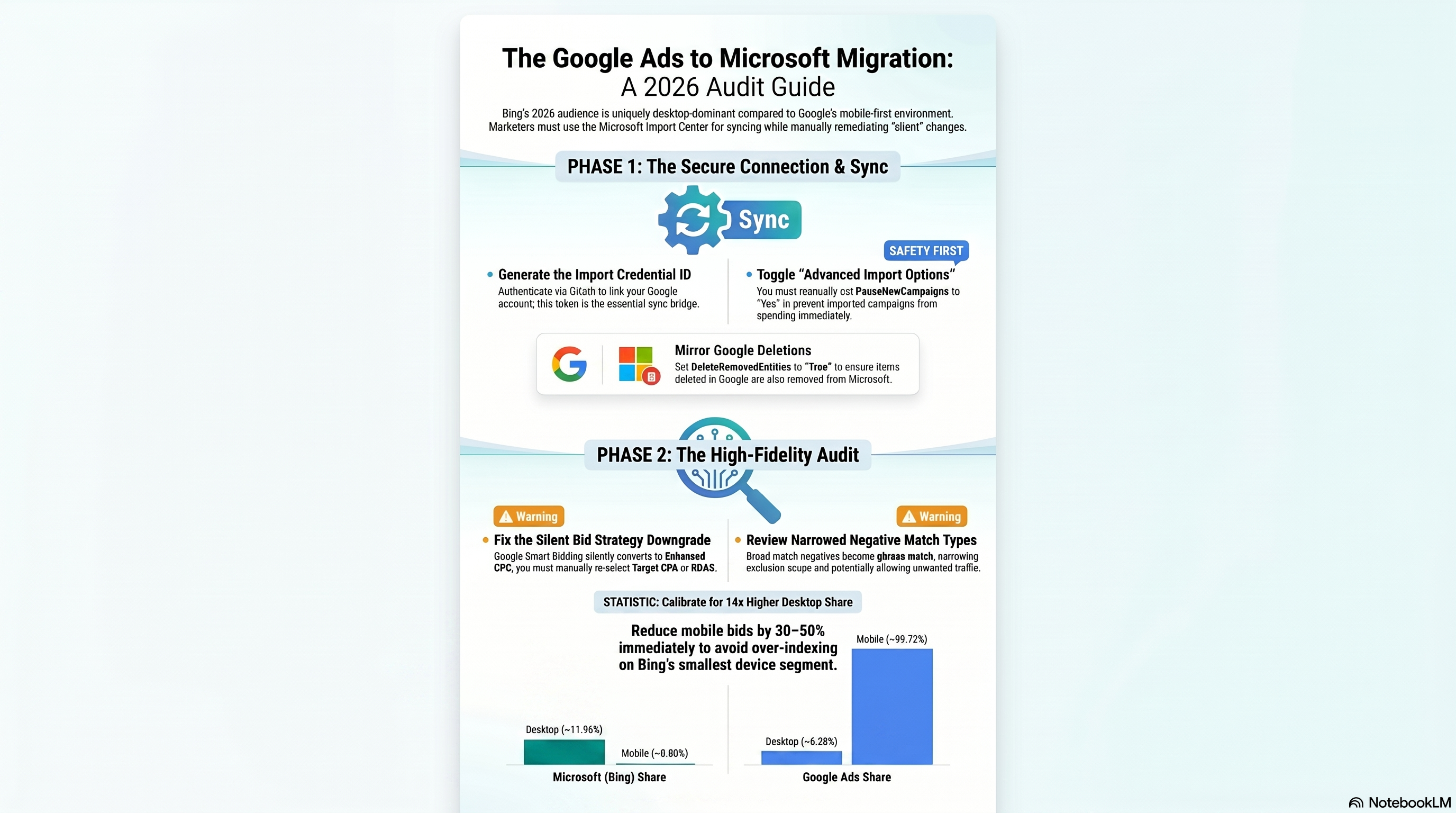
The New Import Center (launched May 2026) consolidates all Google Ads and Meta imports into a single searchable, filterable dashboard with inline error resolution. Before you can schedule anything, you need an Import Credential ID — an OAuth token that binds one Microsoft Advertising user to one Google account.
To create it: type "Import credential ID" in the Microsoft Advertising platform search bar, authenticate with the Google account that owns the source campaigns, and copy the resulting ID. This credential is scoped to your Microsoft Advertising user — if the user changes or the BingAdsImport App permission is revoked in Google, the credential breaks. Changing your Google password alone does not invalidate it.
With the credential ready, navigate to Tools → Import → Import from Google Ads or open the Import Center directly. Sign in with Google when prompted and select the correct manager or child account.
Scheduling a Recurring Import
Name your import job clearly — for example, "Weekly Sync — US Search." Under Schedule, choose a frequency: Auto (Microsoft picks the optimal cadence), Now, Once, Daily, Weekly, or Monthly. For live accounts, Weekly is the standard starting cadence — it picks up Google changes without introducing hourly churn.
Before clicking Import, select Advanced import options — not the plain "Start import" button. The default path lets Microsoft apply its own preferences silently; the Advanced path gives you explicit control over every GoogleImportOption flag. This distinction matters because the flags that cause the most post-import damage all default to the wrong value for a cautious first run.
Advanced Import Options That Matter
The most consequential flags, with their defaults:
| Flag | Default | Risk if you ignore it |
|---|---|---|
PauseNewCampaigns | false | Imported campaigns launch immediately and start spending |
DeleteRemovedEntities | false | Items deleted in Google stay active in Microsoft |
RaiseBidsToMinimum | true | Keywords below $0.05 are auto-lifted to Microsoft's floor |
AdjustmentForCampaignBudgets | 0% | Budgets transfer 1:1; may under-serve at Microsoft's CPCs |
For any first import, set PauseNewCampaigns = Yes. The GoogleImportOption reference documents every flag in full. Treating the defaults as safe is the most common cause of day-one overspend.
Post-Import Audit Checklist
After the import runs, open the Import Center, click the import name, and review the Added / Updated / Skipped / Errors tallies. Click into Errors for inline, item-level resolution steps. The May 2026 Import Center also surfaces tailored performance tips specific to your import results — read this panel before editing any campaign settings.
Work through this checklist in order:
- Campaign status — Confirm intended campaigns are paused if you enabled
PauseNewCampaigns. - Bid strategies — Any campaign using Google Smart Bidding now shows "Enhanced CPC." This is a silent conversion with no error log entry. Enhanced CPC does not optimize toward a conversion target; manually select Target CPA or Target ROAS after import.
- Ad extensions — Sitelinks, callouts, and structured snippets import. Image extensions and lead form extensions do not — build these natively in Microsoft Advertising.
- Negative keyword match types — Broad match negatives from Google become phrase match negatives in Microsoft. Exclusion scope narrows; queries that were blocked may now show ads. Review and supplement as needed.
- Tracking templates — Replace Google-specific
{gclid}parameters with{msclkid}. - Audience lists — Google remarketing lists do not transfer. Rebuild them in Microsoft after installing UET (covered in 04-audience-targeting-linkedin-remarketing).
Device Bid Modifiers: Calibrating for Bing's Desktop Audience
Google campaigns are typically tuned for a mobile-first audience — Google's global mobile search share sits around 93%. Bing's figures run the other direction: mobile share of roughly 0.8% globally, desktop at nearly 12% globally and approximately 17.58% in the US. Applying Google's mobile-uplifted bids unchanged on Microsoft means over-spending on the platform's weakest device channel.
Standard calibration after a first import:
- Mobile: reduce by −30% to −50% as a starting baseline
- Desktop: hold at 0% or test a +10–15% uplift to match the skewed audience
- Tablet: start at −20% as a conservative position
After three weeks, run a Segment → Device report and adjust modifiers until CPAs align across device types. AutoDeviceBidOptimization (defaults to false) can take over device bidding once the account has accumulated 30 days of conversion data — do not enable it on day one with no baseline.
Import Fidelity Failures and Remediation
Two failure modes catch advertisers by surprise well after the initial import.
The campaign reactivation trap. You pause a Microsoft Advertising campaign in the UI. The next scheduled import runs and overwrites that status from Google's active record — reactivating the campaign and restarting spend. The import job is the sync authority; your UI change does not persist. Fix: pause the campaign in Google Ads itself, or stop the import schedule before editing status in Microsoft.
The silent bid strategy downgrade. Google Smart Bidding strategies — Target CPA, Target ROAS, Maximize Conversion Value — have no 1:1 Microsoft equivalent. The import converts them to Enhanced CPC with no error log entry. Find affected campaigns by filtering to bid strategy type post-import, then manually assign the appropriate Microsoft smart bidding strategy and link it to a conversion goal. Conversion goal setup is covered in ch6.
Hands-On Exercise
Goal: Import a single Google Ads campaign into Microsoft Advertising and complete the post-import audit.
Steps:
- Generate an Import Credential ID: search "Import credential ID" in the Microsoft Advertising platform search bar and authenticate with the Google account that owns the source campaigns.
- Navigate to Tools → Import → Import from Google Ads. Select one low-spend or paused test campaign.
- Open Advanced import options and set:
PauseNewCampaigns = Yes,DeleteRemovedEntities = Yes,RaiseBidsToMinimum = Yes. Schedule as Once. - Click Import. In the Import Center, confirm the job shows status "Scheduled" or "Completed."
- Open the import results. Record the Errors count. Click into at least one error item and read its inline resolution steps.
- Check the imported campaign's bid strategy. If the source used Smart Bidding, note the resulting strategy type and document what you would set it to manually.
- Open Device targeting. Apply a −40% mobile modifier and hold desktop at 0%.
Success criteria: Import Center shows "Completed"; imported campaign is in a paused state; you can identify at least one audit finding — a missing extension, a match type conversion, or a bid strategy downgrade — that requires post-import remediation.
Next up: building keyword lists and Responsive Search Ads calibrated for Bing's distinct user demographic in 03-keyword-strategy-rsa.
Keyword Strategy & Responsive Search Ads for the Microsoft Audience
Researching with Keyword Planner
Navigate to Tools → Keyword Planner → Search for new keywords, enter a seed phrase such as "cheap flights to Spain," then scope the results by location, language, and network. The output gives monthly search volume trends, a Competition rating (Low / Medium / High), and a Suggested Bid — all derived from the Microsoft Search Network, not Google's.
One number that trips up every Google-to-Bing migrant: Keyword Planner volumes are lower than Google's equivalent. A term showing 10,000 monthly searches in Google's tool might surface 2,000 in Microsoft's. That gap is real and expected. What the volume column cannot show you is that conversions from those 2,000 Bing impressions often rival the return from Google's 10,000, because of who those searchers are. Use Keyword Planner for relative comparisons between candidate terms and as a directional bid guide, not as a literal budget forecast.
The Bing Audience Advantage
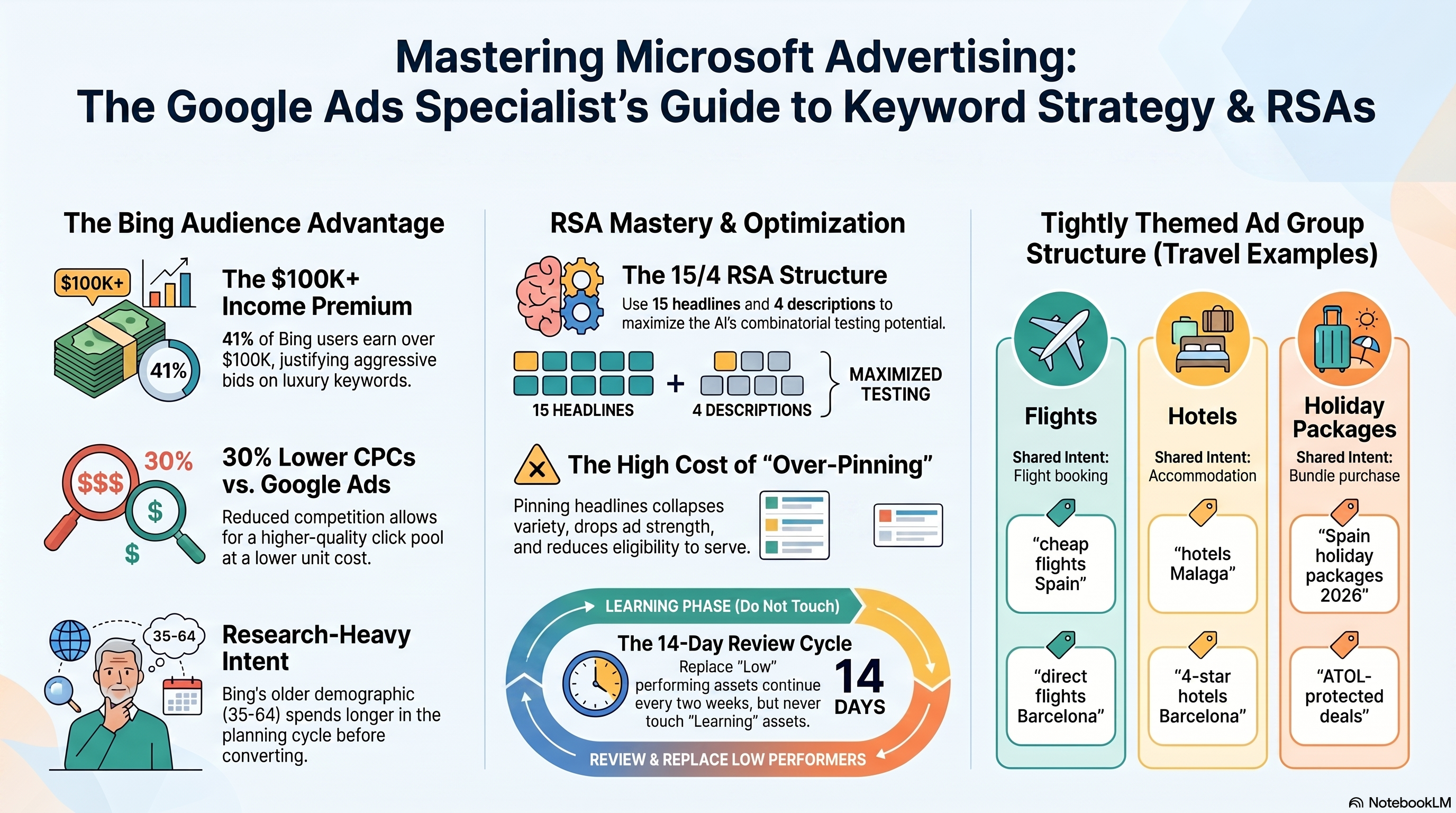
The demographic profile of Bing's user base directly reshapes keyword selection. 48% of Bing users rank in the top 25% of US household incomes, 41% earn over $100,000 per year, and the majority age bracket is 35–54 with a third of US users over 55. These are deliberate, research-oriented buyers who spend 25% more than the average internet user and take longer to convert.
For travel advertisers this premium has two practical keyword consequences. First, lean into high-value categories: "business class flights London," "five-star hotels Barcelona," and "luxury family resort Maldives" deserve higher bids on Bing than raw volume alone would justify, because the audience completing those queries is more purchase-ready than the Google equivalent. Second, favour research-phase queries — "best time to visit Spain," "Spain travel insurance requirements" — because this older demographic spends longer in the planning cycle before converting.
Combined with CPCs approximately 30% lower than Google on average, the result is a higher-quality click pool at a lower unit cost.
Building Tightly Themed Ad Groups
One ad group per intent category is the non-negotiable starting structure. Mixing "flights to Spain" and "Spain hotels" in a single ad group forces your RSA to hedge across two distinct purchase intents — which typically satisfies neither and degrades Quality Score on both.
Launch with three intent-separated ad groups for a travel campaign:
| Ad Group | Shared Intent | Example Keywords |
|---|---|---|
| Flights | Flight booking | cheap flights Spain, flights to Mallorca, direct flights Barcelona |
| Hotels | Accommodation | hotels Malaga, all-inclusive hotels Spain, 4-star hotels Barcelona |
| Holiday Packages | Bundle purchase | Spain holiday packages 2026, all-inclusive Spain holidays, ATOL-protected deals |
Each ad group gets its own RSA, its own dedicated landing page, and its own negative keyword list to prevent intent bleed between groups.
Match Type Strategy on Microsoft's Auction
The Broad Match Modifier is discontinued — keywords using +keyword syntax now behave as phrase match. The three live types are broad, phrase, and exact.
On Microsoft, with roughly 36% less competition than Google, the risk calculus shifts. Broad match paired with Target CPA or Target ROAS auto-bidding is the correct default for hotel and package ad groups. Auto-bidding needs query variety to optimize bids accurately, and the lower competition level means broad match generates less wasteful spend than it would on Google.
Phrase match is the right starting point for flight-intent keywords where price sensitivity and spend control are higher. Start with phrase plus exact until the ad group accumulates 50 or more conversions per month, then introduce broad with Target ROAS.
Exact match belongs on brand terms and conversion-proven head terms only. Relying on exact across an entire travel campaign compounds Microsoft's inherent volume disadvantage and leaves the auto-bidding AI chronically data-starved.
Add campaign-level negatives — "free," "student," "visa," "DIY" — before go-live to block informational queries that broad match may surface.
Writing Your RSA: 15 Headlines, 4 Descriptions
An RSA holds up to 15 headlines (30 characters each) and up to 4 descriptions (90 characters each). At each impression, Bing assembles up to 3 headlines and 2 descriptions. The combination quality depends entirely on the diversity you provide.
Follow this allocation to build a competitive asset pool: - At least 3 headlines include your target keyword or a close variant. - At least 2 headlines state a distinct USP: price anchor, booking speed, trust badge. - At least 2 are short, mobile-punchy calls to action ("Book Now," "Compare Fares"). - No two headlines repeat the same message in different words — the AI exhausts repetitive pools quickly.
Pinning: You can lock any headline to Headline1, Headline2, or Headline3. This is almost always a mistake. A pinned asset occupies its designated slot exclusively — no other headline can appear there. Pin all three positions and you eliminate the AI's combinatorial testing entirely. Reserve pinning for hard legal disclaimers or brand-safety requirements only.
Autogenerated Assets and Ad Strength
Since January 2026, autogenerated assets are auto-enabled for new RSAs on Microsoft Advertising globally, except China and South Korea. When you haven't filled all 15 headline or 4 description slots, the platform's AI generates additional assets from your website content and campaign context. Advertisers who enable the feature see a 5% average CTR increase.
Sensitive verticals — Financial Services, Insurance, Health Services, Pharmaceuticals — remain opt-in rather than auto-enabled. If you manage campaigns in those categories, verify the autogenerated assets setting explicitly before launch; third-party management tools often don't surface the checkbox.
Ad Strength is the platform's readiness score for your RSA: Low, Good, or Best. It reflects headline variety, keyword inclusion, and character utilization. Aim for Good before launch; use the recommendations panel to reach Best within your first review cycle.
The Two-Week Asset Performance Review
After 14 days of serving, open the Ads grid and add the "Asset performance" column. Each headline and description carries one of five labels:
- Low — underperforming; replace with a headline that differs meaningfully in message, not just word choice.
- Good — solid; keep it.
- Best — top performer; write one or two thematically similar headlines to extend the winning signal.
- Unrated — inactive, not enough comparable assets, or below impression threshold.
- Learning — still gathering data; do not touch it.
Act only on Low assets. Replacing a Learning asset resets its impression clock and can trap the ad group in a permanent low-data loop where no asset ever accumulates enough impressions for an accurate rating. Maintain at least 12 active headlines at all times to give the AI sufficient variety.
Hands-On Exercise
Task: Build the keyword and RSA foundation for a three-intent travel campaign.
- Open Microsoft Advertising Keyword Planner. Enter "budget hotels [your target city]" as a seed term, scoped to your target country. Export the results table.
- Identify at least five keywords with Low or Medium competition and a Suggested Bid more than 20% below your typical Google CPC for equivalent terms. Note the volume gap versus Google — this is expected.
- Create three draft ad groups (Flights, Hotels, Holiday Packages) with at least eight keywords each, all sharing a single purchase intent. Add "free," "student," and "DIY" as campaign-level negatives.
- Write a complete RSA for the Hotels ad group: 15 unique headlines (≤ 30 characters each), 4 descriptions (≤ 90 characters each), zero pinned assets. Verify no two headlines repeat the same message.
Success criteria: Three ad groups with ≥ 8 tightly themed keywords each; one Hotels RSA with 15 distinct headlines, 4 descriptions, no pins, and an ad strength score of Good or Best on first save.
Next, you'll layer UET-based audiences and LinkedIn Profile Targeting onto these campaigns to sharpen who sees your ads. 04-audience-targeting-linkedin-remarketing
Audience Targeting: In-Market Segments, LinkedIn Profile Targeting & Remarketing
Installing and Verifying the UET Tag
Before you can build remarketing lists or layer audience signals onto campaigns, the Universal Event Tracking (UET) tag must fire on every page of your site. Create one tag in Microsoft Advertising (Tools → UET tag → Create new), copy the JavaScript snippet, and paste it into your site's global <head> template. One tag, site-wide — multiple tags cause duplicate event counts.
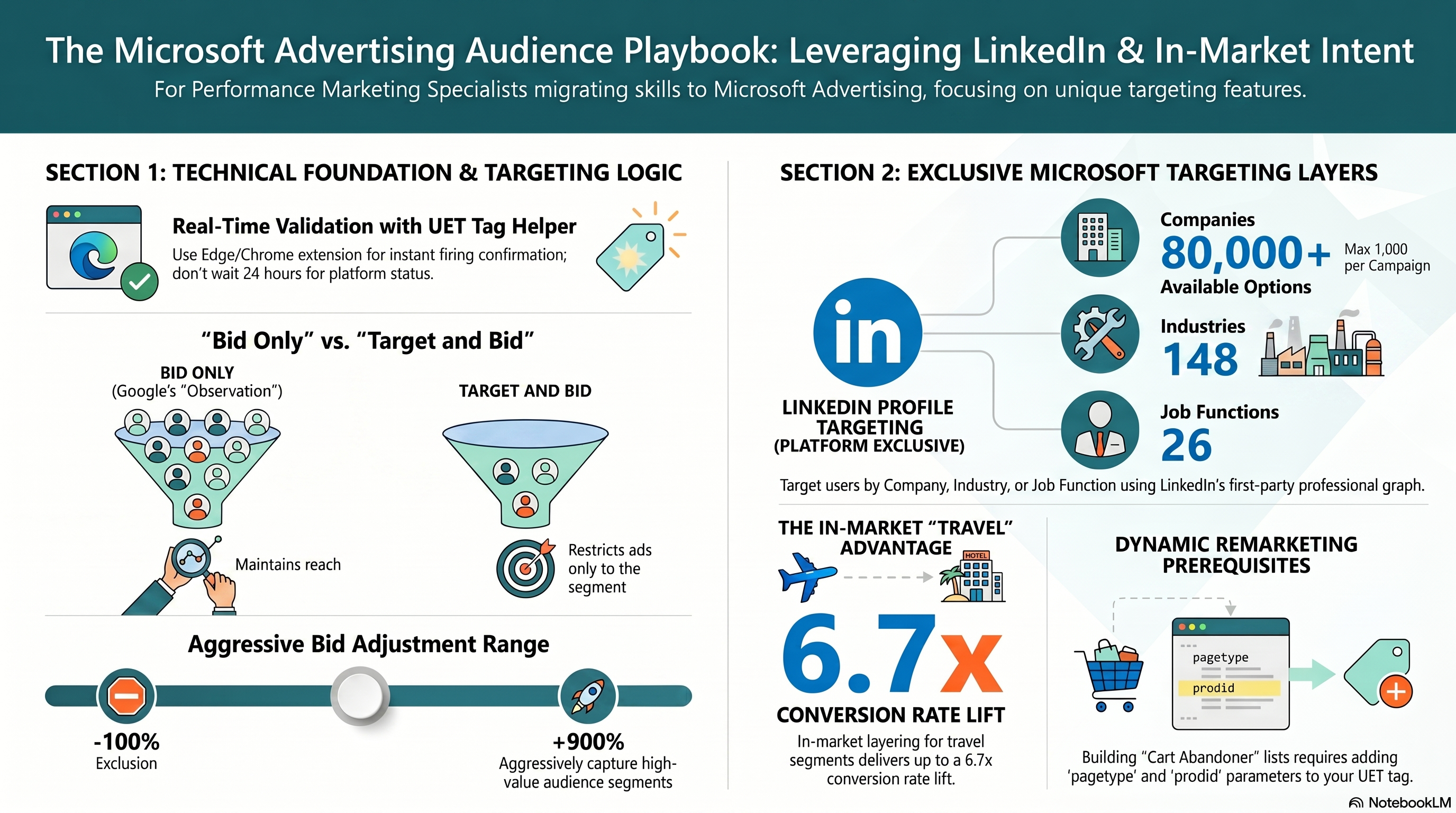
Validation does not require a 24-hour wait. Install the UET Tag Helper browser extension for Edge or Chrome, then open your site. The extension shows a badge count of UET requests fired on the current page; a green badge with count ≥ 1 means the tag is firing correctly. Red or yellow signals a JavaScript error, script conflict, or ad blocker interference — open the browser console to diagnose.
After 24 hours of live traffic, Microsoft Advertising reports tracking status as either "Tag active" or "Tag inactive." An inactive status means no customer data has been received. Verify the snippet is in the rendered HTML and not suppressed by a Content Security Policy or tag manager misconfiguration.
In-Market Audience Segments for Travel Intent
In-market audiences are Microsoft-curated segments built from Bing search queries, ad clicks, and Microsoft property page views. You cannot create or edit these lists — you associate them with campaigns and set bid adjustments. They are available in 90+ markets globally.
For travel campaigns, prioritize: Travel - Air Travel, Travel - Hotels & Resorts, Travel - Vacation Packages, and Travel - Car Rentals. According to Microsoft Advertising travel targeting data, 75% of travel credit card shoppers are associated with an in-market audience category, and combined travel and credit card audience targeting delivers a 4.2x CTR lift and 6.7x conversion rate lift versus unaudited baseline.
One hard platform constraint: in-market audiences cannot be added to Combined Lists. To build a "travel in-market AND past visitor" audience, apply both audiences separately to the same ad group rather than attempting a combined list.
Bid Only vs Target and Bid: Choosing Your Mode
Every audience association uses one of two delivery modes:
- Bid Only (Google Ads equivalent: "Observation"): ads show to all users meeting campaign criteria; the bid adjustment applies only to those who are also audience members. Full reach, refined bidding.
- Target and Bid: ads deliver only to users who are members of the associated audience. Use this when the audience is large and you have conversion evidence.
New audience associations default to a +15% bid adjustment — replace this immediately with a deliberate value calibrated to the segment's conversion premium.
LinkedIn Profile Targeting for Business Travelers
Microsoft Advertising is the only non-LinkedIn advertising platform with access to LinkedIn profile data for targeting. Three dimensions are available per the LinkedIn Profile Targeting announcement:
- Job Function — 26 options including Purchasing, Operations, Sales, and Supply Chain & Logistics
- Industry — 148 options including Airlines/Aviation, Hospitality, and Transportation
- Company — 80,000+ companies; up to 1,000 per campaign across up to 20 ad groups
For a corporate travel management company targeting procurement officers, configure Job Function = "Purchasing" + "Operations" and Industry = "Airlines/Aviation" + "Hospitality" in Bid Only mode. After 30 days, run the Professional Demographics report to identify which dimension combinations convert, then shift top performers to Target and Bid.
Watch for PrivacyStatus = Inactive when stacking all three dimensions narrowly on an Audience campaign. When the intersection is too small for compliant delivery, no ads serve. Broaden one dimension — typically the company list — until PrivacyStatus returns to Active.
Building a Cart-Abandoner Remarketing List
The base UET tag records page visits but cannot classify them by intent. To build a cart-abandoner list, the booking cart page must also fire custom parameters alongside the base tag:
window.uetq = window.uetq || [];
window.uetq.push({'pagetype': 'cart', 'prodid': 'hotel-SKU-123'});
Create the audience in Microsoft Advertising via Audiences → Dynamic Remarketing → Shopping cart abandoners as the Page Type. Set membership duration to 30 days. The list activates once it reaches 1,000 users. Cart abandoners on travel bookings typically justify a bid adjustment of +50% to +100% — well above the platform default of +15%.
If the list populates as "general visitors" instead of cart abandoners, the pagetype parameter is missing or firing on the wrong page. Verify with UET Tag Helper on the cart page specifically: both the base tag and the custom event must fire. Conversion goal linking is covered in chapter 6 — this chapter owns tag installation and remarketing list creation only.
Bid Adjustments for Search and Audience Network Campaigns
Audience bid adjustments in Microsoft Advertising range from -100% to +900%. Adjustments from multiple criterion types multiply rather than add: a +50% audience adjustment combined with a +20% device adjustment yields approximately +80% combined, not +70%.
Practical starting points for travel campaigns: +20%–+30% for in-market audience observation, +50%–+100% for cart-abandoner lists, +15%–+25% for LinkedIn professional segments during the data-gathering phase.
To fully suppress a segment, use audience exclusions (negative audience associations) rather than a low bid adjustment. Setting -90% still permits delivery at a steeply discounted bid; only -100% or a hard exclusion prevents delivery to that audience entirely. Use exclusions for audiences that generate consistently irrelevant traffic.
Layering Audiences on the Audience Network
Audience campaigns (CampaignType = Audience) run exclusively on the Microsoft Audience Network — MSN, Microsoft Outlook, Microsoft 365, and Microsoft Casual Games — and never appear in standard search results. Standard search campaigns cannot reach the Audience Network without image ad extensions.
For a travel prospecting Audience campaign, layer an in-market travel segment (+25%), LinkedIn Job Function = Operations + Sales (+15%), and LinkedIn Industry = Airlines/Aviation + Hospitality (+15%). Upload landscape-wide plus three additional image aspect ratios for maximum placement eligibility. Once the audience pool is validated and large, switch the ad group to Target and Bid to restrict delivery to users matching at least one of the layered criteria.
Hands-On Exercise: UET to Cart-Abandoner in One Session
Goal: Install UET, validate firing in-browser and in-platform, and create a cart-abandoner remarketing list ready for campaign association.
- In Microsoft Advertising, go to Tools → UET tag → Create new. Name it descriptively (e.g., "Brand-Global-UET"). Copy the snippet.
- Add the snippet to your site's global
<head>template. Open UET Tag Helper in Edge or Chrome on your homepage — confirm a green badge with count ≥ 1. - On your booking cart page, add the custom event push (
pagetype: 'cart',prodid: '[SKU]') alongside the base UET tag. Confirm UET Tag Helper shows an additional event on this page. - In Microsoft Advertising: Audiences → Dynamic Remarketing → Shopping cart abandoners. Membership duration: 30 days.
- Associate the audience with your primary search ad group: Mode = Bid Only, bid adjustment = +70%.
- After 24 hours, confirm Tools → UET tags shows "Tag active."
Success criteria: Tag status is active; cart-abandoner list exists and shows "Populating" or a user count; the ad group association shows Bid Only with +70% adjustment.
Chapter 5 builds on this UET foundation — 05-performance-max-setup covers Performance Max campaign creation, asset groups for travel verticals, and how PMax configures its own audience signals independently of the remarketing lists you created here.
Performance Max on Microsoft Advertising: Setup, Asset Groups & AI Optimization
Performance Max (PMax) is Microsoft Advertising's unified AI-driven campaign type — one campaign, one budget, and one creative supply chain served across search, display, native, shopping, and Copilot inventory simultaneously. It reached open beta worldwide in mid-2026, making it available to any qualifying account without allowlisting. If you have run Google's PMax, the model is familiar; this chapter covers Microsoft's specific implementation, where asset group design and three new transparency reports create meaningful operational differences.
Creating Your First PMax Campaign
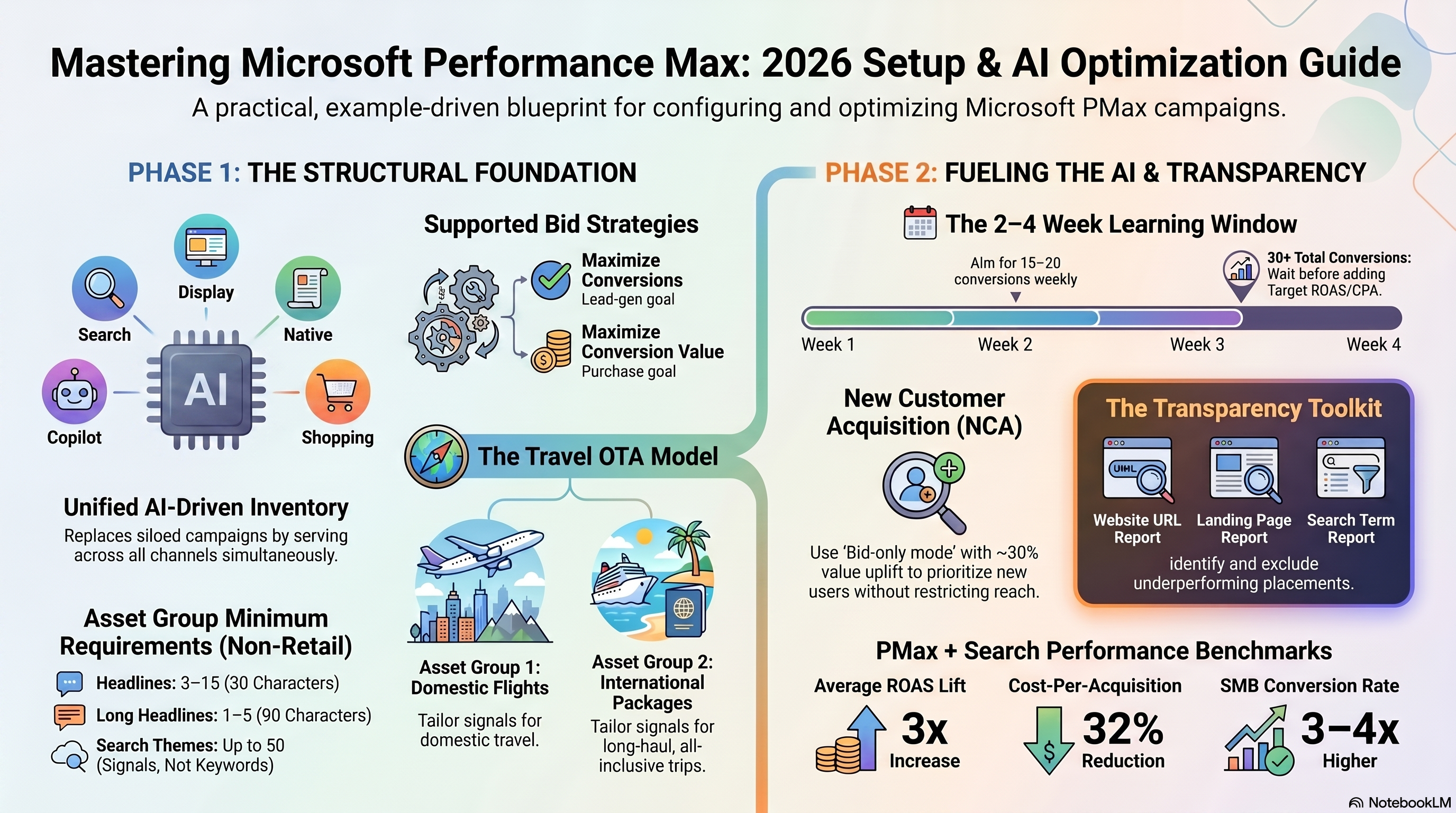
Create a PMax campaign by selecting Campaign type: Performance Max in the Microsoft Advertising UI. You must choose exactly one bid strategy: Maximize Conversion Value (with an optional Target ROAS) for purchase goals where transactions vary in size, or Maximize Conversions (with an optional Target CPA) for lead-gen goals where each conversion has roughly equal value. Do not add a Target ROAS or Target CPA at launch — efficiency constraints before the AI has enough data produce volatile delivery.
PMax campaigns do not support shared budgets; each requires its own daily budget. UET tag installation is covered in 04-audience-targeting-linkedin-remarketing; conversion goal initial setup is covered in 06-conversion-tracking-enhanced.
Fueling the AI: The 2-4 Week Learning Period
PMax enters a learning period of two to four weeks after launch — or approximately 2-3 conversion cycles (the time from first click to conversion). During this window, the AI is discovering which audience segments, placements, and creative combinations convert. Starving the campaign of budget during this phase risks extended learning with volatile cost-per-acquisition.
For a travel OTA at a $100 average booking value, a $150 daily budget gives the AI room to accumulate consistent weekly conversions without being starved of signal. Wait until 30+ conversions have accumulated before layering in a Target ROAS or Target CPA constraint.
Asset Group Architecture for Travel Verticals
The asset-group replaces the traditional ad group inside PMax. Each group holds all creative assets — headlines, descriptions, images, logos, final URLs — plus up to 50 search themes and one optional audience group. The AI dynamically assembles ads from these assets for every eligible placement.
For a travel OTA, the right architecture separates groups by product intent. Domestic flight buyers and international package buyers have distinct search signals, respond to different creative, and convert on different landing pages. A "Domestic Flights" group routes to flyease.com/flights/domestic, uses search themes like "book last-minute domestic flight" and "compare cheap US flights," and shows terminal or airport photography. An "International Packages" group routes to flyease.com/packages/international, uses themes like "Europe vacation packages" and "international flight and hotel deals," and features destination lifestyle imagery.
Microsoft recommends against over-segmenting at launch. Starting with 10+ asset groups dilutes conversion data, leaving each group with insufficient weekly conversions to exit learning mode reliably. Start with two to four groups and subdivide only after each reaches steady weekly conversion volume.
Compliant Creative Assets
Every non-retail PMax asset group requires at minimum: three to fifteen headlines (30 characters each), one to five long headlines (90 characters), two to five descriptions (90 characters), one LandscapeImageMedia at 1.91:1 ratio (min 703×368 px), and one SquareImageMedia at 1:1 (min 300×300 px). The Asset Group Bulk Record documentation details additional optional aspect ratios — adding portrait and wide formats improves ad coverage across display and native surfaces.
Image files must be under 5 MB. JPEG is the preferred format — PNG uploads are accepted but auto-converted to JPEG by Microsoft's servers, which can introduce quality loss on images with fine gradients or text overlays. Export as JPEG directly. Provide as many asset variants as possible: 15 headlines and 5 descriptions give the AI far more combinatorial options than the three-and-two minimums.
New Customer Acquisition Goal
The New Customer Acquisition (NCA) Goal is in open beta for purchase-goal PMax campaigns. It adds a NewCustomerAcquisitionGoalSetting to the campaign, using your uploaded CRM customer list to classify converters as new or returning and applying a bid uplift for new-customer conversions.
Two modes exist. Bid-only mode (NewCustomerAcquisitionBidOnlyMode = true) bids higher for new customers while still serving ads to existing ones — the right default for most travel advertisers who want incremental reach without restricting their audience. Exclusive mode (false) shows ads only to users not on your customer list, which severely limits reach and should be reserved for campaigns explicitly targeting acquisition over retention.
Set AdditionalConversionValue to roughly 30% above your average order value. ALM Corp's 2026 NCA guide recommends a $130 uplift signal on a $100 AOV booking, training the AI to value new-customer conversions more highly. Refresh your CRM customer list weekly — stale lists cause returning customers to be mislabeled as new, inflating acquisition costs without delivering genuine new bookings.
Transparency Reports and Placement Optimization
Microsoft released three PMax transparency reports in May 2026, giving advertisers meaningful visibility into where and why PMax budget is being spent:
- Website URL (publisher) report — breaks down spend, clicks, and conversions by placement URL. Use it to identify which network surfaces are absorbing budget without converting (e.g., gaming content sites with no travel intent).
- Landing Page report — shows performance by final URL, revealing whether Final URL Expansion is routing users to off-topic pages instead of the booking form.
- Search Term report — the newest report (rolling out May 2026), shows the actual customer queries that triggered your PMax ads. This is the primary tool for identifying irrelevant query traffic and informing search theme refinements.
To find underperforming placements, filter the Website URL report for spend and ROAS below your target across multiple weeks. Add underperformers to a campaign-level placement exclusion list. The May 2026 guidance warns against excluding placements during the first two to four weeks — early exclusions interrupt the AI's ability to discover where conversions occur.
Search Theme Refinement
Search themes are optimization signals, not keywords. The AI is not required to match them literally — they guide the optimizer toward relevant query territory. Since the January 2026 update, each asset group now supports up to 50 search themes, doubled from the previous 25-theme limit.
Use the Search Term report to drive refinement. Export queries with 10+ impressions and zero conversions, group by intent (booking, research, off-topic), and update themes to reinforce purchase signals. Removing a theme does not block a query — for hard exclusions, add self-serve negative keywords (available since 2026).
Hands-On Exercise: Launch a Two-Asset-Group PMax Campaign
Objective: Build a two-asset-group PMax campaign for a travel OTA and verify all three transparency reports return data.
Steps: 1. Create a Performance Max campaign with Maximize Conversions bid strategy and a daily budget sized for consistent weekly conversions during the learning period. 2. Build AG_DomesticFlights: 5+ headlines, 2+ descriptions, landscape image (1.91:1, ≥703×368 px), square (1:1, ≥300×300 px), 5-10 booking-intent themes. 3. Build AG_InternationalPkgs with destination-specific creative and themes. 4. Do not add Target ROAS or Target CPA. Note the campaign launch date. 5. After seven days, open Reports → Performance Max and verify all three reports return populated rows.
Success criteria: Both asset groups active, 5+ conversions in week 1, all three transparency reports populated.
Next up — conversion goals that feed PMax and standard Search campaigns with accurate attribution: 06-conversion-tracking-enhanced.
Conversion Tracking, Enhanced Conversions & Performance Reporting
Conversion Goal Types: Page-Visit vs. Micro-Conversion
UET supports seven conversion goal types. For a hotel or travel advertiser, two cover the majority of use cases.
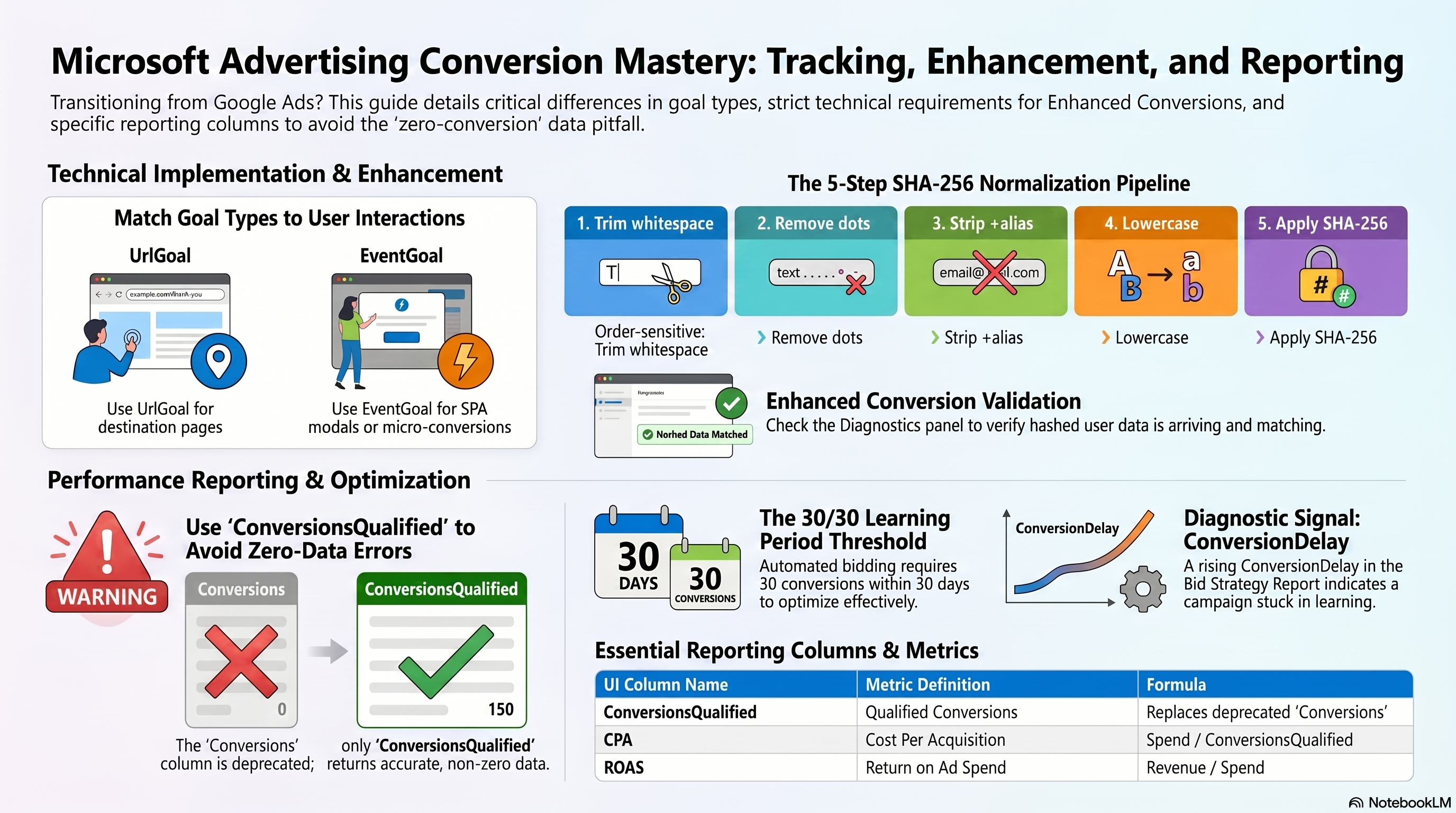
UrlGoal (page-visit / booking confirmation) fires automatically whenever a user loads a destination URL that matches your configured pattern. No custom event code is needed — the base UET tag sends a page load event, and Microsoft matches it against the goal. Use UrlGoal for macro-conversions where the final action is defined by reaching a unique URL: /booking/confirmed, /order-complete, /thank-you. According to the Universal Event Tracking documentation, this is the simplest goal type to deploy and should be your first conversion goal in any new account.
EventGoal (micro-conversion) fires when a specific custom event is pushed to the UET data layer — either window.uetq.push('event', 'action', {…}) in JavaScript, or a custom CAPI payload. Use EventGoal for intent signals that don't change the URL: "viewed hotel details," "started checkout," "added to cart," "completed search." Each micro-conversion feeds additional signal to your bidding model and gives you full-funnel visibility. Critically, a single-page-application modal that opens without a URL change will never trigger a UrlGoal — those interactions require EventGoal.
One UET tag ID supports multiple conversion goals simultaneously. There is no need to create separate tags per goal.
Linking Goals to Your UET Tag
Your UET tag was installed and verified in chapter 4. Goal creation follows this path in Microsoft Advertising: Tools → Conversion Tracking → Conversion Goals → Create Conversion Goal.
Select the goal type (Url or Event), configure the revenue value (fixed or variable), and choose the UET tag ID from the dropdown. That tag ID is the bridge between user behavior on your site and conversion credit in your campaigns. For your booking confirmation UrlGoal, assign a fixed revenue value equal to your average booking amount — this populates Revenue in your performance dashboard and is what drives Target ROAS optimization.
For EventGoals, configure the event action name to match exactly what your JavaScript pushes. A mismatch between the UI's event name and the window.uetq.push action string produces silent zero-conversion recording with no error surfaced.
Enhanced Conversions: Hashed First-Party Data
Enhanced Conversions recovers conversions that cookie restrictions and cross-device journeys would otherwise miss by supplementing UET data with hashed customer identity signals. Launched across Americas and Europe in February 2024 per the Enhanced Conversions blog, it is now broadly available.
Implementation requires SHA-256 hashing of both the customer's email (em) and phone (ph) at the point of conversion, passed in the CAPI userData object. Microsoft matches these hashes against its logged-in user graph. No plaintext PII ever leaves your server.
Email normalization is order-sensitive. Apply all five steps before hashing:
- Trim leading/trailing whitespace
- Split at
@; remove all dots from the user portion - Remove
+aliasfrom the user portion - Convert the entire address to lowercase
- Apply SHA-256; format output as lowercase hexadecimal
```python import hashlib
def hash_email_for_enhanced_conversions(raw_email: str) -> str: email = raw_email.strip() user, domain = email.split('@', 1) user = user.replace('.', '') user = user.split('+')[0] normalized = f"{user}@{domain}".lower() return hashlib.sha256(normalized.encode('utf-8')).hexdigest()
def hash_phone_for_enhanced_conversions(e164_phone: str) -> str: # Input must be E.164 format, e.g., "+14255551234" return hashlib.sha256(e164_phone.encode('utf-8')).hexdigest() ```
Validating with the Conversion Diagnostics Panel
After deploying Enhanced Conversions, verify it is working at Tools → Conversion Tracking → Conversion Goals → [Select Goal] → Diagnostics. The panel reports three independent health indicators:
- Goal status: Active, Inactive, or No recent conversions
- Tag status: Whether the UET tag is sending events to this goal
- Enhanced Conversions status: Whether hashed user data is arriving and being matched
A healthy goal shows green on all three. If Enhanced Conversions status shows "No data received," audit your CAPI payload for the userData.em or userData.ph fields — they are most likely absent or structurally malformed. The diagnostics panel does not replace the UET Tag Helper extension; use both, since the extension confirms client-side tag firing (ch4) while the panel confirms goal-level data health (ch6).
Building Your Performance Dashboard
Use the AdPerformanceReport to build a standard dashboard. Per the AdPerformanceReportColumn documentation, these columns are required for meaningful analysis:
| Column | API Name | Formula |
|---|---|---|
| Impressions | Impressions | Raw count of ad displays |
| Clicks | Clicks | Paid clicks |
| CTR | Ctr | (Clicks / Impressions) × 100 |
| Avg. CPC | AverageCpc | Spend / Clicks |
| Conversions | ConversionsQualified | Use this — not deprecated Conversions |
| CPA | CostPerConversion | Spend / Conversions |
| Revenue | Revenue | Advertiser-reported conversion revenue |
| ROAS | ReturnOnAdSpend | Revenue / Spend |
| Top Impression Rate | TopImpressionRatePercent | % of impressions in mainline positions |
The Conversions and AllConversions columns were deprecated in 2022 and now return 0 in all reports. ConversionsQualified is the replacement; it returns double-precision floats that support partial offline attribution.
Bid Strategy Report: Reading Learning-Period Signals
Pull a BidStrategyReport with a 30-day date range whenever a Target CPA or Target ROAS campaign is underperforming. Key columns: ConversionDelay, ConversionsQualified, AvgTargetCPA, CostPerConversionQualified.
Three new metrics launched in May 2026 per the product news blog: AvgTargetCPA, AvgTargetRoas, and AvgTargetImpressionShare, available at campaign, account, and portfolio scope. At account scope, AvgTargetImpressionShare is weighted by campaign daily spend.
Learning period diagnostic checklist:
- ConversionsQualified < 30 over 30 days → bid strategy has stopped optimizing; this is the prerequisite failure
- ConversionDelay rising → conversions lagging significantly behind clicks
- AvgTargetCPA diverging from TargetCPA → algorithm struggling to hit the set target
- CostPerConversionQualified > 150% of TargetCPA → system still in pattern-matching mode
Per the Budget and Bid Strategies guide, Target CPA stops optimizing below 30 conversions per 30-day period; Target ROAS requires 30 conversions AND non-zero revenue. Remediation priority: first add micro-conversion EventGoals to feed more signal; then broaden match types to increase eligible volume; then temporarily switch to Maximize Conversions until the threshold is met.
Hands-On Exercise
Build a full conversion tracking stack for a hotel booking campaign.
- In Microsoft Advertising, create a UrlGoal named "Booking Confirmed" pointing to your
/booking/confirmedURL. Assign fixed revenue equal to your average booking value. Link it to the UET tag installed in ch4. - Create an EventGoal named "Checkout Started" with event action
begin_checkout. Link it to the same UET tag. - Enable Enhanced Conversions on the Booking Confirmed goal. Add the Python hashing function above to your checkout server. Pass hashed
emandphin the CAPIuserDataobject alongside themsclkid. - Wait 24 hours, then open the conversion diagnostics panel for each goal. Confirm all three status indicators are green.
- Pull an AdPerformanceReport using the dashboard columns from this chapter. Verify
ConversionsQualifiedreturns non-zero data and that ROAS calculates correctly.
Success criteria: Both goals show Active status in diagnostics, Enhanced Conversions shows "Data received," and your performance dashboard returns ConversionsQualified > 0 with correct CPA and ROAS values.
Next: 07-cross-platform-budget-allocation — using your per-channel conversion data to split budget intelligently between Google Ads and Microsoft Advertising.
Cross-Platform Budget Allocation: Splitting Spend Between Google Ads and Microsoft Advertising
The 2026 Travel Benchmarks You Need to Know
Before you split a single dollar, anchor on the 2026 numbers. Google Ads travel campaigns average a $2.14 CPC, a 9.32% CTR, and a 5.83% conversion rate — delivering a CPA of $44.70 according to WordStream's 2026 benchmark report, which analyzed 13,474 US campaigns. Microsoft Advertising's hospitality CPA sits at roughly $15 — the lowest of any vertical on the platform — while travel CPC drops to $0.73 per SearchLab.nl 2026 statistics. That is a 67% CPA advantage for hotel campaigns.
The caveat is volume. Microsoft's US desktop search share is 14.2%, and its travel CVR is 2.4% vs Google's 5.83%. Microsoft's advantage is strongest at the bottom of the funnel for hospitality-category purchases.
What transforms Microsoft Advertising from "cheaper reach" into a genuine growth channel is audience exclusivity: 38% of Bing users are unreachable via Google Ads. Those are not the same users at a lower price — they are different users entirely. That figure is your primary justification for running both platforms simultaneously.
The 70/30 Starting Split
For any advertiser running both platforms for the first time, start at 70% Google Ads / 30% Microsoft Advertising. Google carries the proven conversion volume that keeps your CPA stable while Microsoft accumulates the 50+ conversions required for campaign-level statistical validity.
Two conditions shift the default. If your audience skews under 35 or is heavily mobile, tilt to 80/20 Google: Microsoft's user base averages 45 years old and is Windows-desktop concentrated. If your product targets business travelers or higher-income households, the 70/30 baseline stays defensible long-term — Microsoft users are 40% more likely to earn over $75K, a strong fit for premium travel products.
On a $10,000 monthly budget: $7,000 to Google, $3,000 to Microsoft from day one. Avoid the instinct to start at 90/10 to "test gently" — a $1,000 monthly Microsoft budget rarely generates 50 conversions within 60 days, which means you cannot make a statistically valid reallocation decision at the window's close.
Running the 30-60 Day Test Window
A 30-60 day window is the minimum before any reallocation decision. Microsoft's smart bidding needs 3 days to recalibrate after budget changes up to 25%, and 7 days after larger changes per Dataslayer 2026. Lower-volume markets may need the full 60 days to reach 50 conversions.
Four performance triggers determine your action during the window:
- CPA spike >20% within 7 days: Diagnostic flag — investigate creative relevance and bid settings. Not yet a reallocation trigger.
- CPA trend >15% over 14 consecutive days: Reallocation candidate — shift budget toward the channel holding CPA.
- ROAS below target for 3 consecutive days: Flag for reallocation review.
- Budget pacing outside 90-110% for 3+ days: Fix daily caps first; pacing problems routinely masquerade as performance problems.
Do not react to day-3 or day-5 CPA readings on a brand-new campaign. The platform is mid-learning.
Building Your Cross-Platform Unified View
In-platform dashboards overstate results because Google Ads and Microsoft Advertising both claim credit for the same conversions when their attribution windows overlap.
GA4 is the default. Go to Admin → Attribution Settings and set the model to data-driven attribution (DDA) — if you have 400+ conversions on your key event and 20,000+ total conversion events in the lookback window. Below those thresholds, GA4 falls back to last-click, which systematically undervalues Microsoft Advertising as an assist channel. The interim fix: use GA4's Model Comparison report with linear attribution as a proxy, per the 1ClickReport GA4 guide.
Expect 20-40% variance between what Google Ads reports and what GA4 attributes — normal, not a tracking failure.
Incremental ROAS: The Only Number That Matters
When both platforms run simultaneously, their combined reported ROAS overstates true performance by 30-50% because each platform counts conversions the other also claimed. Incremental ROAS (iROAS) corrects for that.
iROAS = Incremental Revenue ÷ Incremental Spend
To measure it, run a geo holdout: divide comparable markets into a test group (Microsoft Ads active) and a control group (Microsoft Ads paused; Google Ads unchanged in both). Run for 30 days, then export sessions, conversions, and revenue by region from GA4 → Explore → Segment Overlap. The revenue delta between test and control groups is your incremental revenue. Divide by Microsoft's spend in the test group.
If iROAS exceeds your ROAS target, Microsoft is creating new demand — increase its allocation. If iROAS falls below 1.0, Microsoft is intercepting conversions that Google would have captured anyway. That is your stop signal, per SegmentStream's incrementality guide.
The Budget Reallocation Decision Framework
After the test window closes and you have iROAS data, three factors drive the revised allocation:
1. Desktop conversion rate share. Pull device-level data from both platform reports. If 40%+ of your total conversions originate from desktop, Microsoft's Windows-concentrated inventory will deliver ROI faster. Below 40%, the advantage compresses for audiences that lean mobile.
2. CPA by product category. Never use blended CPAs to decide. For hotel packages, Microsoft's ~$15 hospitality CPA consistently beats Google's $44.70 travel CPA. For last-minute tour bookings with high mobile intent, Google's 5.83% CVR may win. Analyze per campaign type and let the category-level data drive the split.
3. Audience overlap rate. If more than 30% of your Microsoft Advertising audience was already converted through Google Ads in the prior 30 days, Microsoft is largely bidding on already-won customers rather than incremental users, per Myntagency's overlap analysis. Below 30% overlap, you have meaningful incremental reach.
Before any split change above 15% of total budget, document the rationale: platform CPA, desktop share percentage, overlap rate, iROAS result. That log keeps the decision auditable and reversible.
Hands-On Exercise: Build Your First Allocation Decision Log
Using your Google Analytics 4 account, open Explore → Segment Overlap. Add Session source / medium as a dimension and compare google / cpc vs bing / cpc for the last 30 days. Record four data points in a shared document: (1) CPA per channel, (2) desktop conversion share as a percentage of total conversions, (3) overlap estimate using GA4's User Explorer with matched hashed-email audiences, and (4) a proposed starting split with a one-line justification referencing each of the three decision factors.
Success criteria: A filled allocation rationale document that names a specific split percentage, cites your measured CPA by channel, states whether your desktop conversion share clears the 40% threshold, and includes your audience overlap estimate.